
What is the Meta Ads Library?
The Meta Ads Library is Meta's public archive of the ads running on its apps. Meta launched it in 2018 to make political advertising transparent, then opened it to every active ad. Today anyone can see what a brand is running on Facebook, Instagram, Messenger, WhatsApp, Threads and the Audience Network, for free and without a Facebook account.
What stays in the library, and for how long, depends on the ad:
- Ads about social issues, elections or politics stay for seven years, with spend ranges and audience data.
- Ads shown in the European Union stay for one year after their last impression, as Article 39 of the Digital Services Act requires, with reach, age, gender and targeting.
- Ads shown in the United Kingdom stay for one year too, for ads that ran after 1 July 2025.
- All other ads are visible only while they run. When the advertiser switches one off, it leaves the library.
A new ad appears in the library within 24 hours of its first impression, and changes to an ad show up within 24 hours as well.
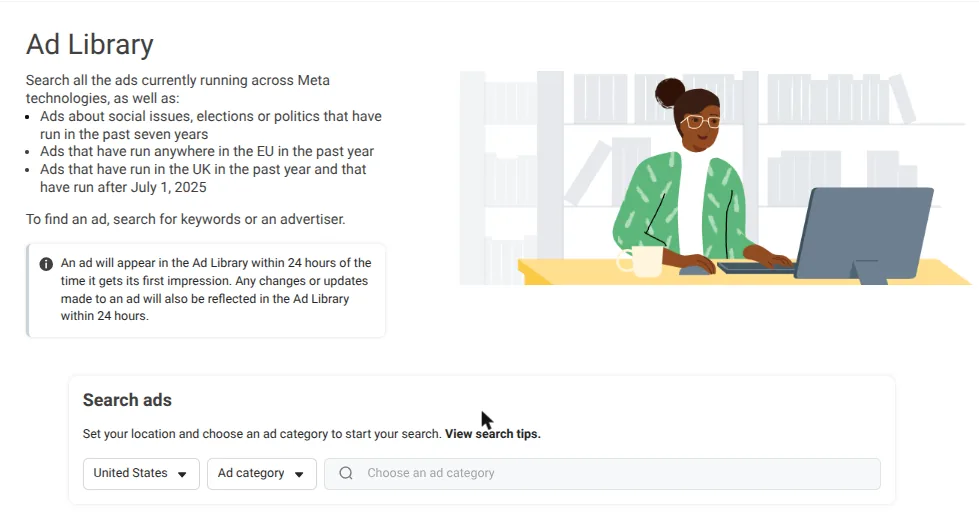
That last point matters more than it looks. The library is a live window, not an archive. If you find an ad worth studying, save its link or its Library ID the same day.
How to open the Meta Ads Library (with or without an account)
Go to facebook.com/ads/library. You need no account: search, filters and ad details all work logged out. The search builder at the top of this page opens the same address with your filters already set.
Want every ad from one brand? Don't go through its Facebook Page: logged out, Pages show a login prompt. Type the brand name in the library and pick its Page from the suggestions.
If the page stays blank or the search never loads, turn off your ad blocker for facebook.com. Meta warns that its advertising tools may not work as expected while one is enabled.
How to search the Meta Ads Library, step by step
- Choose a country. Pick where the ads are shown, or All. Pick an EU country when you want the extra transparency data described below.
- Choose the ad category. Keep All ads. The other four (issues, elections or politics; housing; employment; financial products and services) are special categories with their own rules.
- Search by advertiser or by keyword. Type a brand name and Meta suggests matching Pages: pick one to see all of its ads. Type a phrase and press Enter to search the text of every ad.
- Put the phrase in quotation marks to get an exact-phrase search. "online course" returns ads with those two words together, not every ad that mentions "online" somewhere.
- Remember that keywords reach inside the creative. For videos, the library searches the transcript as well as the ad text; for memes, the text in the image. A phrase a coach says on camera is searchable.
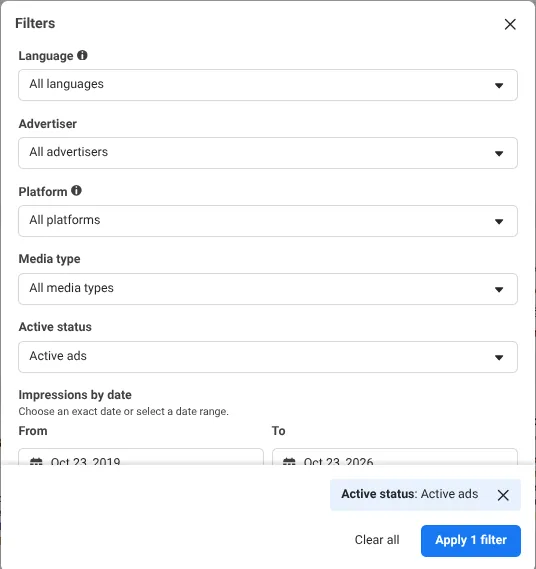
- Apply the filters. Click Filters to narrow by language, advertiser, platform, media type, active status and dates. Results are sorted by impressions, highest first; switch to newest with Sort by.
- Open an ad. Click See ad details to see its versions and placements and, for ads shown in the EU, its reach.
You now know what is running. The harder question is which of these ads are working, and that is what the rest of this guide answers.
Every Meta Ads Library filter explained
| Filter | What it does | When to use it |
|---|---|---|
| Country | Shows ads delivered in one country, or in all of them | Your market; an EU country when you want reach data |
| Ad category | All ads, or one special category: politics, housing, employment, financial products | Keep "All ads" for marketing research |
| Language | Filters by the language of the ad text | Find ads in your language while searching all countries |
| Advertiser | Keeps the ads of one or more Pages | Compare two or three competitors side by side |
| Platform | Facebook, Instagram, Audience Network, Messenger, WhatsApp, Threads | See where a competitor puts its budget |
| Media type | Images, memes (images with text), videos, or ads with no image or video | Study one format at a time; with "Videos" your keyword is also searched in the transcript |
| Active status | Active, inactive, or both | "Active" for what works now; inactive ads appear mostly for EU and political ads |
| Impressions by date | Ads that had impressions within a date range | With "Active": ads still running that were already running before that date |
Advanced search: build the URL yourself
Every search in the library is a URL. Once you know the parameters, you can write a search in seconds, keep it in a note and reopen it every week. We checked each of these on 23 October 2026:
| Parameter | Example | What it does |
|---|---|---|
| active_status | active, inactive, all | Status of the ads |
| country | US, FR, ALL | Country where the ads are shown |
| q | coaching | Your keyword |
| search_type | keyword_exact_phrase, keyword_unordered, page | Exact phrase, all the words, or one advertiser |
| view_all_page_id | 123456789012345 | Every ad from one Page (with search_type=page) |
| media_type | all, image, video | Format |
| publisher_platforms[0] | Platform | |
| start_date[max] | 2026-09-23 | Only ads with impressions on or before that date |
| sort_data[mode] | total_impressions, relevancy_monthly_grouped | Sort by impressions or by newest |
| locale | en_US, fr_FR, it_IT | Language of the interface |
Or skip the syntax: the search builder at the top of this page writes the URL for you.
How to read an ad card
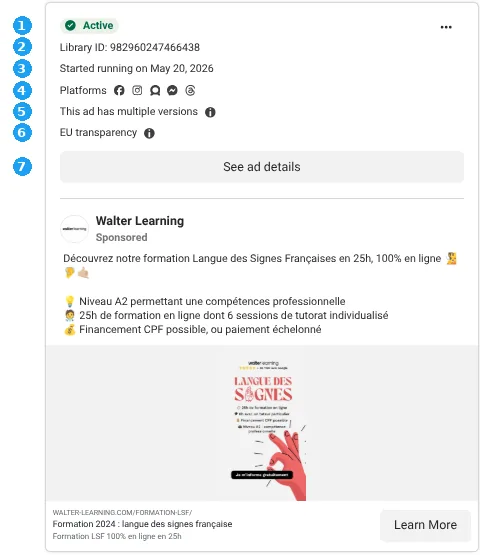
Each result is a card. Here is what every line tells you, using a real ad we looked at on 23 October 2026: a French sign-language course by Walter Learning, an online training company.
- Active or Inactive: whether the ad is running today.
- Library ID: the permanent identifier of the ad. Save it: it is the only reliable way to find the ad again.
- Started running on: the day the ad went live. The Walter Learning ad started on 20 May 2026, so it had been running for 156 days when we checked.
- Platforms: one icon for each app where the ad appears.
- This ad has multiple versions: the advertiser is testing variations of copy, image or headline inside the same ad. Click through them: the differences tell you what they are testing.
- EU transparency: the ad was shown in the EU, so its details include reach, age and gender (see below).
- N ads use this creative and text: the same creative runs in several ads, often for different audiences or campaigns. Advertisers duplicate what they want to scale.
- This ad is not active for some audiences: Meta has restricted where it can run. Read it as a warning, not as a sign of success.
- See ad details: versions, placements and, for ads shown in the EU, reach and audience.
Copy the "Started running on" date into the counter below to see where an ad stands.
How long has this ad been running?
Enter the date shown next to “Started running on” in the ad card.
Longevity is a clue, not proof: some ads stay on out of inertia or with tiny budgets. Also check how many versions use the same creative.
What the Meta Ads Library doesn't show you
The library shows what is running. It doesn't show whether it works. Here is what you can and can't see:
| Data | Ads outside the EU | Ads shown in the EU | Political ads |
|---|---|---|---|
| Creative, copy, call to action, link | Yes | Yes | Yes |
| Start date and status | Yes | Yes | Yes |
| Ads that have stopped | No | Yes, for one year | Yes, for seven years |
| Reach | No | Yes, estimated | Yes, in ranges |
| Breakdown by age, gender and location | No | Yes | Yes |
| Targeting chosen by the advertiser | No | Location, age, gender | Partly |
| Spend | No | No | Yes, in ranges |
| Clicks, sales, return on ad spend | No | No | No |
No column tells you whether an ad is profitable. To judge that you need indirect signals: how long the ad has been running, how many versions and duplicates it has, and how many people it reaches. Together they make the survival test.
The EU trick: see the reach, age and gender of ads shown in Europe
Since August 2023 the Digital Services Act has required Meta to publish more data on every ad shown in the EU. It is the most useful data in the whole library, yet only one of the five top-ranking English guides we analyzed in October 2026 explains it.
Open See ad details on a card with the EU transparency badge and expand the European Union section. For the Walter Learning ad, on 23 October 2026, it showed:
- Audience chosen by the advertiser: France, ages 25 to 65+, all genders.
- Reach: 2,566,868 Meta accounts in the EU had seen the ad at least once.
- Breakdown: 80% of that reach was women. The largest age group was 45–54 (32%), followed by 35–44 (26%).
- Advertiser and payer: who runs the ad and who pays for it.
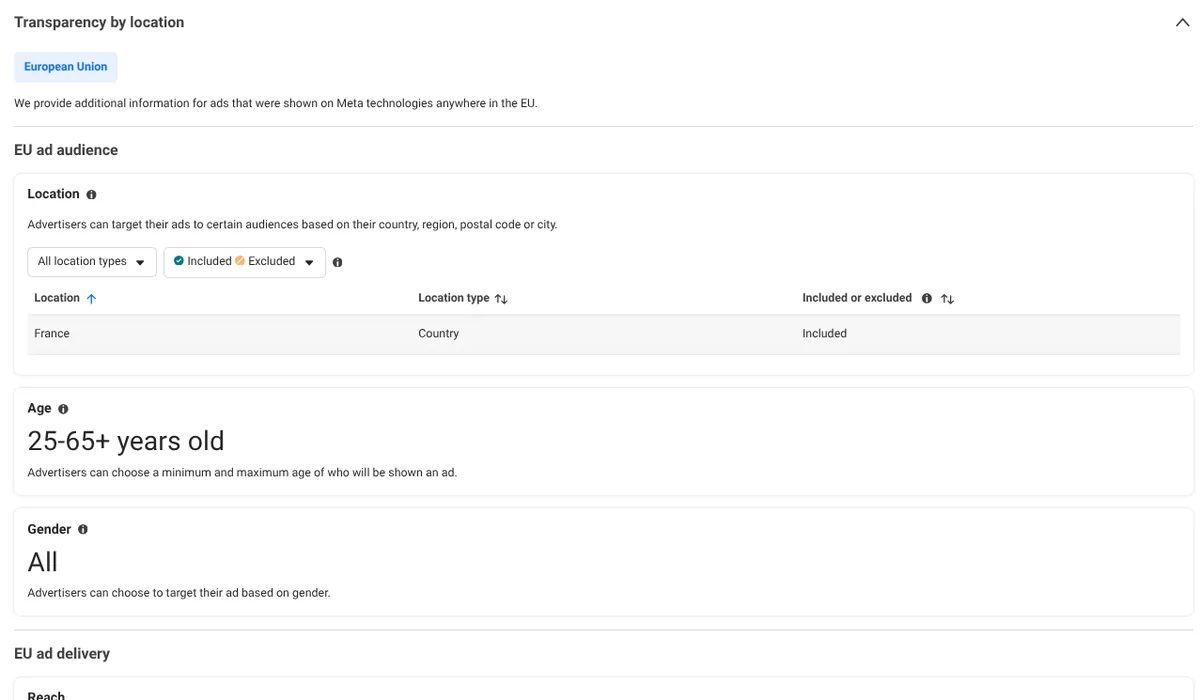
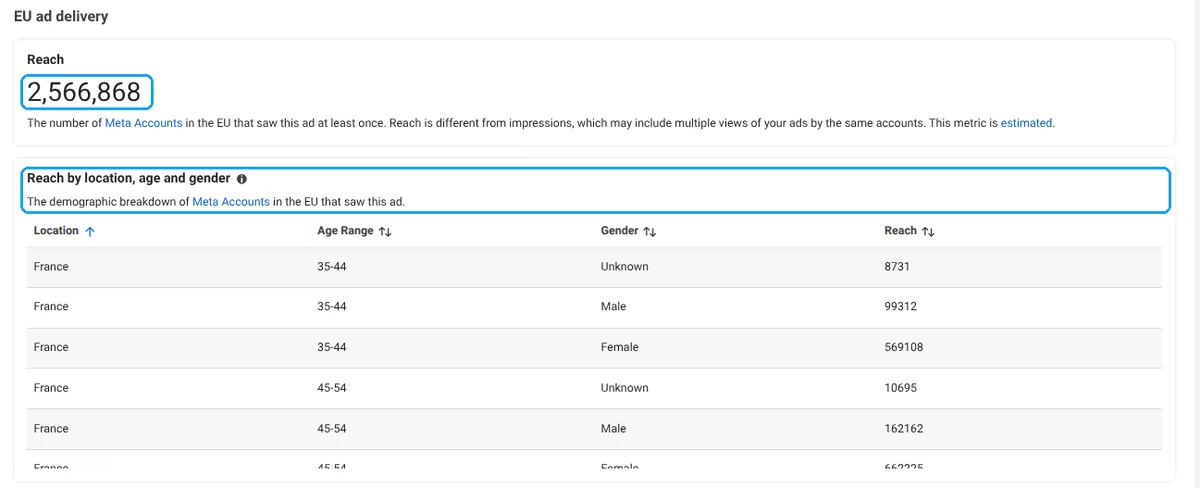
Compare the targeting with the result. The advertiser chose everyone from 25 to 65+. Meta's delivery system shows ads to the people it predicts will respond, and it concentrated this one on women over 35. The breakdown is a strong hint of who actually buys the offer, not who the advertiser hoped to reach.
Your competitors don't advertise in Europe? Look at the European advertisers in your niche: the way an offer is sold travels better than you think.
The survival test: how to spot ads that are working
Nobody pays for months for an ad that doesn't sell. Every day an ad runs, someone pays for it. An advertiser who keeps an ad live for 90 days has looked at the numbers ninety times and decided to keep paying. That makes longevity the strongest performance signal in public data.
Use three thresholds:
- Under 30 days: still in testing. Draw no conclusions.
- 30 to 90 days: it survived the first tests. Worth studying.
- Over 90 days: an ad the market has already paid for. Study it in depth.
To find them fast, combine Active with an Impressions by date filter that ends 30, 60 or 90 days ago. The results are ads still running that were already running back then. The Running for at least option of the search builder does exactly this.
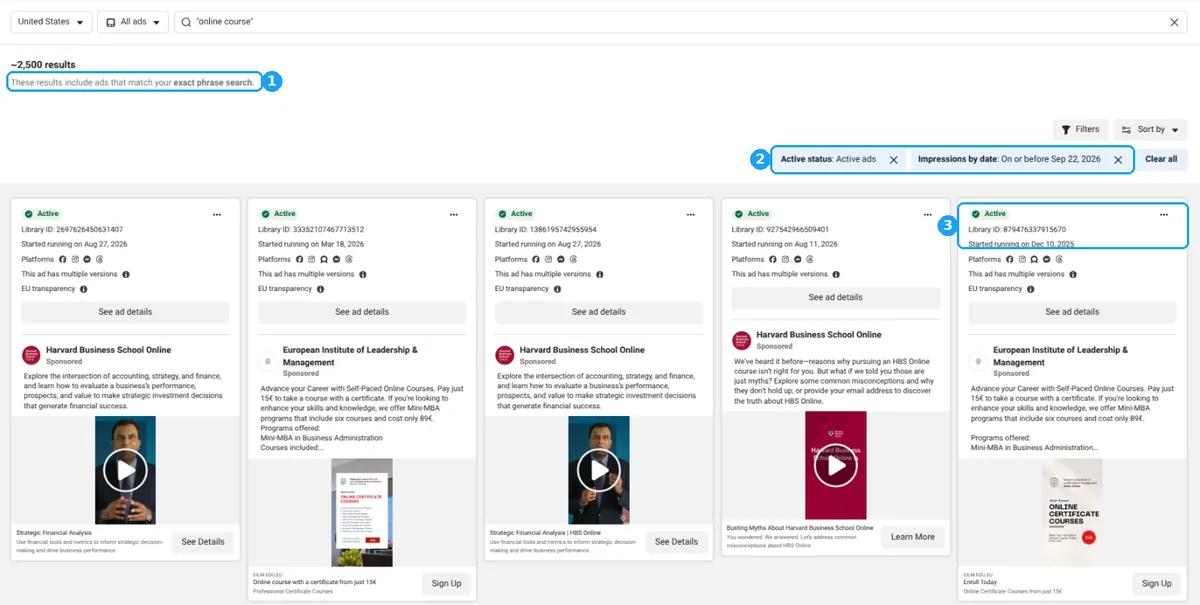
Then confirm with the second signals. Look for several versions, the same creative in several ads, a high position when results are sorted by impressions and, in the EU, a large reach. Longevity alone can mislead: brand budgets, retargeting and plain inertia keep some ads alive.
What surviving ads look like: data from Pantheon
We looked at the 849 ads from course creators, educators and service businesses that had been running for more than 90 days in Pantheon's library, in an extraction made on 23 October 2026.
| Format | Courses and education (432 ads) | Services (417 ads) |
|---|---|---|
| Video | 44.2% · median 179 days | 56.4% · median 197 days |
| Image | 34.5% · median 216 days | 18.9% · median 262 days |
| Carousel | 21.3% · median 173 days | 24.7% · median 148 days |
Video is the most common format, but static images had the longest median run in both groups. If you adapt a video for Reels or Stories, keep the text out of the areas the interface covers: check it with the Instagram safe zone checker.
| Persuasion mechanism | Share of surviving ads (769 classified) |
|---|---|
| Identity | 37.6% |
| Free value | 32.9% |
| Problem-agitation | 30.6% |
| Authority | 22.8% |
| Curiosity | 18.6% |
| Myth busting | 11.7% |
| Comparison | 8.6% |
| Social proof in numbers | 8.5% |
| Before / after | 8.1% |
| Price anchoring | 6.1% |
| Scarcity | 5.7% |
| Urgency | 5.6% |
Scarcity and urgency appear in fewer than 1 surviving ad in 17. The ads that last speak to who the reader is or wants to become, give something away first and name the problem precisely. Countdowns and "last spots" are rare among them.
How we measured: these ads entered Pantheon through keyword searches with a minimum-duration filter and through manual curation, so they are not a random sample of Meta. They describe what surviving ads look like, not how many ads survive. Duration runs until our last check, so it underestimates ads that are still active. Mechanisms are classified by Pantheon's AI on a closed list of 22, and one ad can use several, so the shares don't add up to 100%.
The next step: the ads that survived, for your offer
Pantheon finds the ads that have been running for months in your market and explains why they sell, with 22 persuasion mechanisms. Then it turns the one you pick into three ads for your offer.
Start my 5-day free trialNo credit card required
Read the persuasion, not just the creative
Most people look at an ad and see a video, a headline, a color. Ask a different question: why would this make someone click? Break every surviving ad into four parts:
- Hook: the first line of text or the first three seconds of video.
- Angle: the reason to care, such as a problem, a desire or an identity.
- Offer: what you get, at what price and on what terms.
- Format: video, image or carousel, and the style of the creative.
Then name the mechanism under each part. Take the Walter Learning ad again:
- The text (in French; our translation) promises a sign-language course "in 25h, 100% online" that leads to an A2 level "for professional use". A bounded effort and a professional outcome: identity, because the reader becomes someone with a new skill.
- The image shows "1,100+ Google reviews" with five stars: social proof in numbers.
- One line answers the price objection before it comes up: public training funds (CPF) or payment in instalments.
The ad wins on clarity: a precise promise, a number that proves other people bought, and the price question settled in one line. Pantheon's 22 persuasion mechanisms are the full list we use to read ads this way. For one mechanism in depth, see our testimonial ad examples, taken from ads that ran for months.
Follow the click: analyze the landing page behind the ad
The ad sells the click. The landing page sells the offer. Click through on every surviving ad and check four things:
- Message match: does the headline repeat the promise of the ad, in the same words?
- Proof: are the numbers from the ad (reviews, students, results) visible without scrolling?
- Friction: how many fields, steps or clicks stand between the visitor and the action?
- Offer: price, guarantee, payment options, bonuses. What does the page say that the ad leaves out?
When an ad has been running for months, its landing page has usually passed the same test. Together they show you the whole path that sells, from the first line of the ad to the sign-up. Pantheon checks the coherence between ad and landing page in every analysis.
From research to your own ads (without copying)
Copying a competitor's ad makes you look like them, and their creative isn't yours to reuse. Transfer the mechanism instead:
- Pick one surviving ad and name its mechanism, for example identity plus free value.
- Write down why it fits that audience.
- Translate it into your offer, your customer and your voice.
- Write three versions with different hooks and the same mechanism.
Say you coach consultants and you find a course ad built on identity ("become a certified…"). Three hooks you could test:
- "For consultants tired of selling their time by the hour" (identity)
- "What separates an €80-an-hour consultant from a €5,000 package" (identity and curiosity)
- "The 3 questions I ask before I take on a client" (free value)
Pantheon's Adapter does this step for you. It turns the ad you pick into three variants for your offer, written with your customer profile and your brand voice. It is instructed not to copy.
The next step: the ads that survived, for your offer
Pantheon finds the ads that have been running for months in your market and explains why they sell, with 22 persuasion mechanisms. Then it turns the one you pick into three ads for your offer.
Start my 5-day free trialNo credit card required
A 20-minute weekly competitor routine
- Monday, 5 minutes: open your saved searches, one per competitor and one per keyword, with Running for at least 30 days.
- 5 minutes: note the new ads and the ones that disappeared since last week.
- 5 minutes: for every new survivor, write its hook, angle, offer, format and mechanism on one line.
- 5 minutes: pick one mechanism to test in your next ad.
Download the free weekly routine checklist (PDF): one A4 page with the 4 steps, the survival thresholds and a table to fill in. No email required.
Keep the notes in one sheet, with the date and the Library ID. In three months you will have a map of what your market keeps paying for. If you follow Pages in Pantheon, it re-checks them every week and emails you when they launch new ads.
Meta Ads Library vs Ads Manager vs third-party tools
| Meta Ads Library | Ads Manager | Ad archives | Pantheon | |
|---|---|---|---|---|
| Price | Free | Free (you pay for your ads) | Paid | Paid, 5-day free trial |
| Whose ads | Everyone's active ads | Only yours | Everyone's, collected over time | The Pages that matter for your offer |
| Performance data | None | Complete, for your ads | Varies | Longevity, versions, EU reach |
| Keeps ads after they stop | Only EU and political ads | — | Yes | Yes, the ads you save |
| Explains why an ad works | No | No | Varies | Yes: 22 mechanisms, awareness level, ad and landing page |
| Best for | Checking one brand for free | Measuring your own campaigns | Browsing large swipe files | Coaches, course creators and consultants who want the ads that survived in their market, and why |
Pantheon is not an archive of millions of ads, and its public library covers mostly French and US advertisers today. If you need every ad from every online store, an archive suits you better. If you sell courses, coaching or services and want to know which ads to learn from, start with Pantheon's radar for your offer.
Comparing paid tools? We checked the prices and features of 7 of them in our ad spy tools comparison for coaches and consultants.
Meta Ad Library API and Ad Library Report
The Ad Library Report summarizes spending on ads about social issues, elections and politics, by advertiser and by country. It serves researchers and journalists more than marketers.
The Ad Library API lets developers query the library with code. To use it you verify your identity and accept Meta's Platform Terms, which limit what you can do with the data: for example, you can't sell or license it (section 3.a.iv, version of 3 February 2026). To follow a handful of competitors, the web library and a few saved searches are faster.
Common Meta Ads Library mistakes
- Copying the ad. You borrow their words and none of their reasons. Transfer the mechanism.
- Treating "active" as "profitable". Check how long it has run, how many versions it has and, in the EU, its reach.
- Studying only big brands. A brand with a TV budget plays a different game. Look for advertisers your size, in your niche.
- Ignoring the landing page. Half of the funnel is behind the click.
- Saving nothing. Outside the EU, ads vanish when they stop. Note the Library ID the day you find one.
- Searching only your own niche. A mechanism that works for a language school can work for a business coach.
Meta Ads Library: frequently asked questions
How do I check how long a Facebook ad has been running?
Open the ad in the Meta Ads Library and read the "Started running on" date on its card, then count the days to today (the counter above does it for you). For a whole market, filter on active ads with an Impressions by date range that ends 30, 60 or 90 days ago: what stays has been running at least that long.
Is the Meta Ads Library free?
Yes. It is free and public, and you can use it without a Facebook account.
Do I need to log in to use the Meta Ads Library?
No. Search, filters and ad details work without logging in. Facebook Pages may ask you to log in, so search the brand inside the library instead. You only need an account, with identity verification, to use the API.
Can I see how much a competitor spends on Meta ads?
Not for commercial ads. Spend ranges appear only for ads about social issues, elections or politics. For other ads, use indirect signals: how long they run, how many versions they have and, in the EU, their reach.
How long do ads stay in the Meta Ads Library?
Commercial ads stay while they are running. Ads shown in the EU stay for one year after their last impression, ads shown in the UK for one year (if they ran after 1 July 2025), and political or social-issue ads for seven years.
Does the Meta Ads Library show Instagram ads?
Yes. The same library covers Facebook, Instagram, Messenger, WhatsApp, Threads and the Audience Network. Use the Platform filter to see only Instagram ads.
Does the Meta Ad Library show all ads?
It shows every ad currently running on Meta apps in the countries you select. It does not show ads that have stopped, except EU, UK and political ads, and it never shows results such as clicks or sales.
Why isn't the Meta Ad Library working?
Usually because of an ad blocker: Meta warns that its tools may not work while one is enabled. Disable it for facebook.com, check the country filter and try a shorter search.
Can I download ads from the Meta Ads Library?
There is no download button. Save the Library ID or the link to the ad. Pantheon keeps a copy of the ads you save, even after they disappear from Meta.
Is it legal to look at competitors' ads?
Yes. The library is a public transparency tool. Studying ads is fine; reusing someone else's creative or copy is not, because it stays protected by copyright.
Facebook Ad Library or Meta Ad Library: what is the difference?
None: it is the same tool. Facebook renamed it the Meta Ad Library after the company became Meta in 2021.

Written by
Henok Ey. Anani
Founder of Pantheon
Henok builds Pantheon and studies the Meta ads that keep running for months, with Pantheon's 22 persuasion mechanisms and Meta's EU transparency data. Every number on this page has a source or comes from Pantheon's data, with the method stated.